If your store has many similar products, displaying all of them will help your customers choose the right product (and more of them) faster. Today you will see plugins for WooCommerce to create product tables (as a list with prices). You will also learn how to make your WooCommerce pricing more attractive with promotions and discounts. Finally, I'll show you tools & tips to increase sales and customers' trust.
Contents
- WooCommerce Pricing & Products in a table view
- Why and when to use pricing tables
- Best plugin to create product tables
- Best plugins to create pricing tables in WooCommerce
- How to increase sales in an online store
- How to add promotions & discounts in WooCommerce
- Summary - WooCommerce Pricing & Product Tables
- Tools & Tips
- Boost Sales with WooCommerce BOGO and Tiered Pricing
- Product Price in WooCommerce - everything you should know about
- 5 essential WooCommerce tips to boost your sales
- WooCommerce Bulk Discount<br>for Guests, User Roles & Members
- WooCommerce Products - The basics of e-commerce product management
WooCommerce Pricing & Products in a table view
In this post, you will learn when it is worth showing WooCommerce products in a pricing table. I thought it would be great to compare a few plugins to help you in choosing the best one. I tested some of them and collected the results in the table. However, the article will not only be about adding a product table list in WooCommerce!
You will find 12 ways to increase the attractiveness of your store! You will also see how to manage WooCommerce pricing by using promotions & discounts (that will be displayed in the pricing table too). You'll learn how to sell more & gain new customers. Let's begin!
- Prices based on product quantity
- Bulk discounts
- Category Pricing
- Discount for members
- Discounts for orders
- Pricing for loyal customers
Why and when to use pricing tables
Showing products in a list (table view) can be a good solution for stores with a wide offer. It is good if such a table has options for filtering, sorting, and searching products. Customers will be able to find and compare them faster.
The product table will show more items transparently. The list of products, with the most important information about them (especially name and price), will be easy & fast to read. Customers will be able to buy products directly from the table view. So, no more need to search for products and jump from one browser tab to another to buy them.
Showing products in one place will be an opportunity to increase the average value of the cart.
Best plugin to create product tables
You can find a lot of free plugins in the WordPress repository.
I chose a few of them, tested & compared them. I also checked their compatibility with our plugin that creates promotions and discounts in WooCommerce (Flexible Pricing). I hope the table below will help you to choose the right plugin for adding product tables.
Best plugins to create pricing tables in WooCommerce
Why and how did I make this comparison?
In many stores, I have seen this way of presenting products. I thought the comparison would be readable and handy when choosing the right plugin. We also often receive questions about the possibility of displaying sale prices managed by our Flexible Pricing plugin in such product tables.
In the table below, you will find a few plugins that I tested for their functionalities, settings, and styling table options. Hopefully, the comparison will help you find the right plugin. You will also find it handy if your current solution lacks some options.
| Plugin | Column & Data Options | Table styling | Supported Products | Additional Options | Compatible with Flexible Pricing |
|---|---|---|---|---|---|
| Active Products Tables for WooCommerce | Limited to 7 columns. Additional columns are possible. Lots of settings | Easy | All types | Sorting, filtering - 2 variables, search field | |
| JustTables - WooCommerce Product Table | No limit, but a choice from the ones available | Not flexible or in PRO | All types | Search field. Others (sorting, filtering) in the PRO version | |
| Multiple Products to Cart for WooCommerce | Choice from several columns available (via shortcode). There is no option to add your own columns | Fast but only a few options | Simple & Variable | Sorting (price, title), easy to add products, but no search field. Quick start | |
| Product Table for WooCommerce - (wooproducttable) | Lots of options | For each column. Settings for various devices (e.g. mobile). Global settings in PRO | All types | Sorting, filtering (price available in PRO), search field | |
| WooCommerce Product Table (PRO) | Lots of columns and custom fields. Adding by typing the names of columns (manually in shortcodes). You may use this free add-on though | Easy and quick setup. No GUI. Only one style for all tables | All types | Sorting, filtering, search field. Caching & lazy load. The plugin works only after activating the license key. Few hints (visual) for settings | |
| WooCommerce Product Table by WooBeWoo | Limited. Additional columns in PRO with ACF (free) | Lots of settings. Ability to add your CSS and JS. No GUI, only 1 style for tables. Adaptation to various devices (mobile). | All types, but you need to add products beforehand. Automatic adding of new products to the table available in PRO | Sorting, search field. Filtering in PRO. Print button | |
| WooCommerce Product Table Lite | A lot of columns, settings, and custom fields. Integration with ACF (in PRO) | Many settings (also for various devices). You can add custom CSS. 2 styles to start | All types | Sorting (by price, popularity, name, newness), filtering and searching by name & content | |
| WPC Product Table for WooCommerce | Several columns are available. Additional fields in PRO | Basic settings. Three simple color styles. Additional styles added through CSS classes | All types | Column sorting, search field (name), few additional options |
If you know of any other WooCommerce product table plugins, let us know.
How to increase sales in an online store
You can show product tables in WooCommerce but also use other ways to attract more customers and to increase your sales.
Why it's worth doing? Because each of them will help you get more clients and build your online business. Encourage shopping in your store. And get loyal & satisfied customers!
Increase sales & get new customers (12 ways)
-
Promotions and Discounts
- price is one of the most important factors when buying. You can use coupons in WooCommerce and adjust pricing for products, categories, order value, depending on the quantity, etc. See the Flexible Pricing plugin below to learn how to create such discounts in your WooCommerce store.
-
Content marketing
- attracting traffic from the web with high-quality content (written, video, graphics). Creating content and getting high positions in search results for phrases searched by your potential customers is a long process. It also depends on the industry in which you operate, the niche of products, and the current position on the market (your website, competition, type of products, and trends). Content marketing will allow you to get traffic from search engines (mainly Google) and websites where you publish content/ video, e.g. YouTube or Instagram. The more good and wanted content you publish, the more traffic you will get to your website.
-
Payment methods, shipping, return policy
- very important issues for the buyer. More payment and shipping methods help to convince customers. They can choose the preferred payment method and how (and where) they want to collect the parcel. On the other hand, adding a clear return (or exchange) policy will gain the trust of your customers and increase the overall credibility of your store. Remember that the convenience of the purchasing process and high quality of customer service will make a really big difference.
-
Photos and Product Description
- when viewing products, apart from the price, we are strongly guided by the visual part. The method of presentation (pictures, gallery, graphics) and a good description (accuracy, parameters, method of use, examples of use) can encourage or discourage us to buy a product. Pay attention to the professional and attractive presentation of products. Also, remember to communicate the benefits of them in the first place.
-
Design
- create a clear, legible, and good website design (also for product and category pages in your store). The design should be tailored to your customers and fit their expectations. What is most important, it should help them in a smooth purchasing process. So, remember about the right colors, styling the content, and layout (often less is more).
-
Banners and pop-ups
- you can add information about exceptional delivery conditions or a special offer with a timer (countdown). You can use the pop-up to draw attention to new products, encourage to subscribe to a newsletter, inform how to receive a free e-book, or notify about events (podcasts, workshops).
-
Opinions about your store
- store and product reviews increase the credibility of your business. In addition to price, they are the most important factors when shopping online. Of course, the SSL certificate (https://) is already a standard.
-
Price comparison websites and Google
- a.k.a. how to reach more customers by showing your products on the biggest websites or search results. For example, you may add your product feed to Google Merchant (also free search results).
-
Sales websites
- this way is simple. Let's assume that you add your products to Amazon. Some people will probably find your online store anyway - thanks to their curiosity and baiting (you show only a limited number of products). For buyers directly on Amazon, you can add a thank-you note or a discount coupon for subsequent purchases in the store. There may be more possibilities so choose wisely and find the best websites in your country for your products' presence.
-
Gift Cards
- idea for an additional product in your store. Coupons and vouchers are often chosen as a gift. Adding them will let you gain undecided people and also new customers (who will eventually receive & use such a gift).
-
Affiliate/ Affiliate Program
- you can start your affiliate program and reward other websites/bloggers/stores (e.g. on a commission basis) for recommending your products. You can also become an affiliate yourself and offer external products in your store. In this way, you will check the interest of more products among current customers (perhaps you will add them later). You will also get new ones, e.g. by adding better-quality descriptions, articles and promoting products on the web.
-
Price lists and Product Tables
- add product tables with prices (as a list) for specific categories. Also, check whether supplementing your offer with products of different quality (range of services) or complementary (e.g. an etui for a phone) will increase your sales.
How to add promotions & discounts in WooCommerce
Flexible Pricing WooCommerce is a plugin that allows you to add various types of discounts to your store.
You can set promotions for users, categories, specific products (and their variations), selected roles, and groups of users, guests, or orders.
See all possibilities of Flexible Pricing WooCommerce and the plugin documentation.
Prices based on product quantity
You may set promotions such as:
- buy X products to get a discount (percentage or amount) on Y pieces of the product,
- buy X units of the variant and get Y units cheaper,
- and buy X items and get Y for free.
The plugin will allow you to set such rules for each product.
Of course, you may add rules for each variation and different combinations of the same product. For example:
- buy 2 and get 1 for 50%,
- buy 5 and get the sixth for $1,
- or buy 10 for 9 - you will get one for free.
You can also set different prices for the product depending on the quantity of the product (or the variation) purchased.
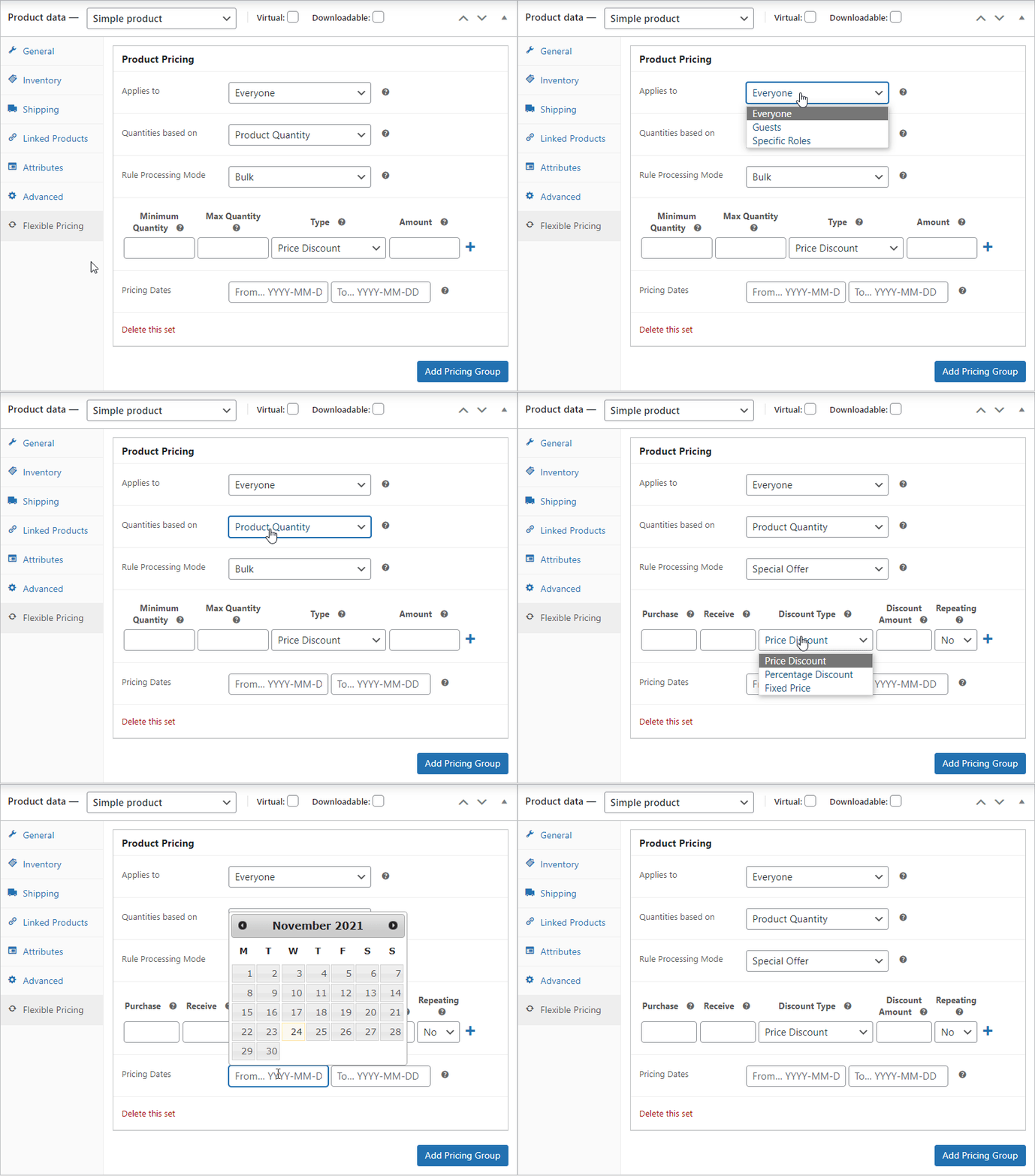
The settings at the product level are the most extensive. They will allow you to fully control discount rules.
WooCommerce Bulk Discounts
Prices can be adjusted depending on quantity for each product and globally, e.g. for a specific role or group of customers (wholesale customers). Flexible Pricing is compatible with the Groups plugin. You can create special pricing for user groups. So, after logging in to the store, selected customers will see their discounted prices.
Category Pricing in WooCommerce
If you want to add discounts for a group of products, use Category Pricing.
You may set a discount percentage (or amount) for each category.
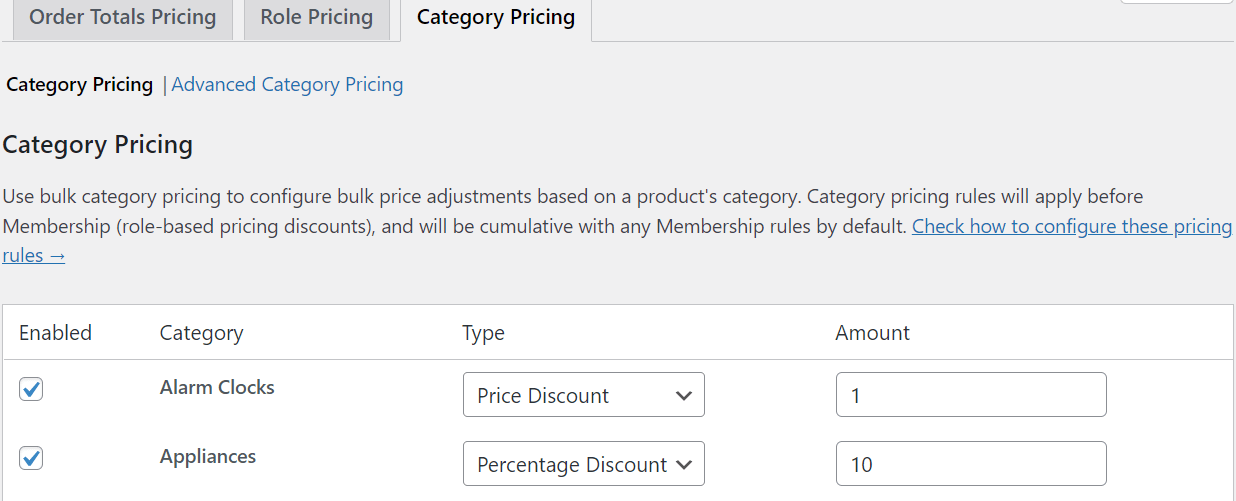
You can also add various conditions, e.g. "you will get a product for $1 if the cart includes a product from the selected category". Find such settings in Advanced Category Pricing.
Discount for members
As I mentioned earlier, you can set the promotions to run only for users from certain roles or groups for each product. With Flexible Pricing, you can also enable discounts for roles and groups globally (for all products).
The settings are similar to those for categories (percentage or amount discounts).
Discounts for orders
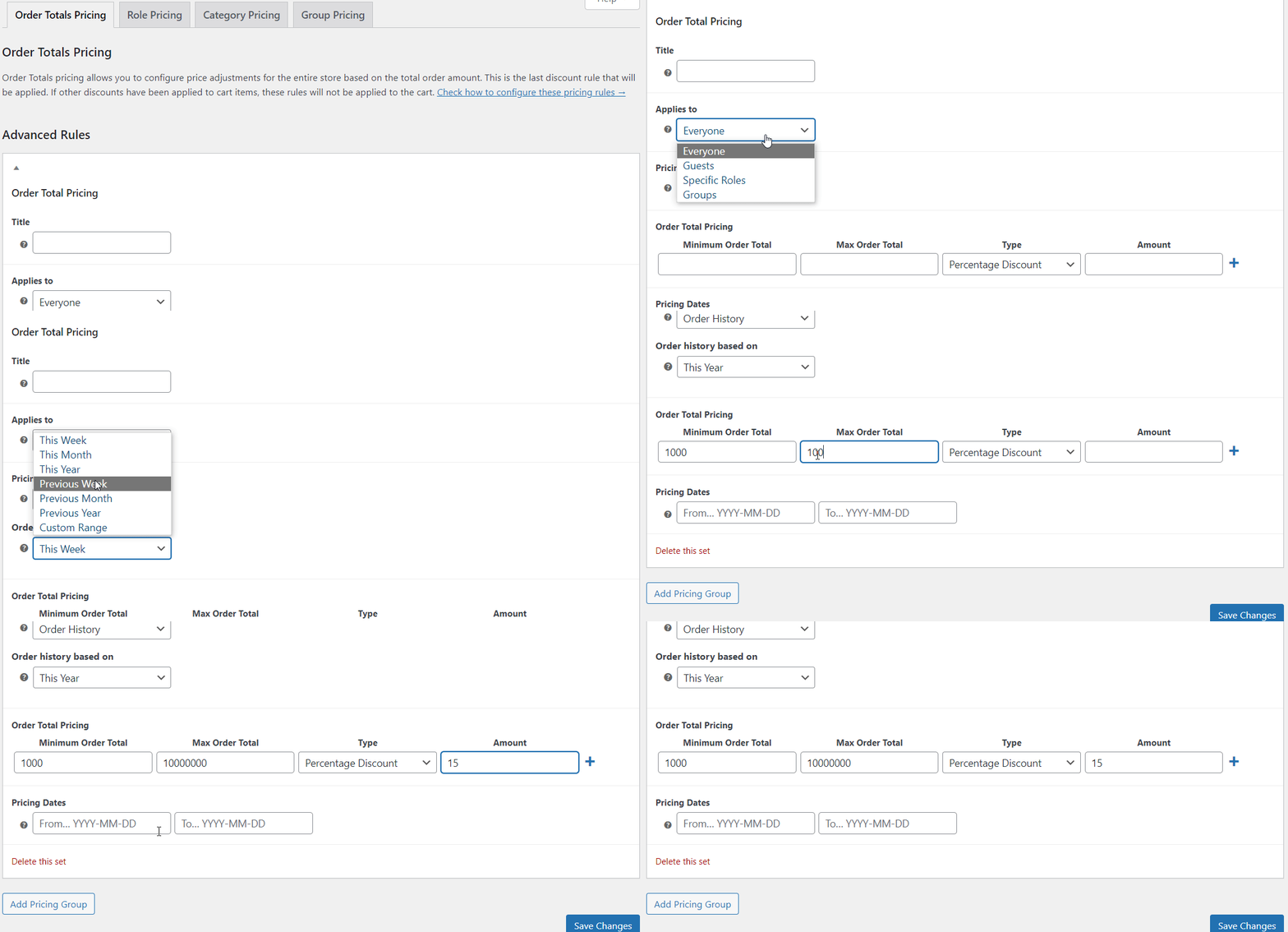
You can also set a discount based on the basket value. You may set, for example, a few thresholds: 10% for orders over $1000 (and then 20% over $2000, etc.). You can of course define when the discounts work and if to use them for specific users/groups. You may also add more rules based on selected categories.
Pricing for loyal customers
A very useful option if you want to get more purchases from returning customers and build their loyalty to your store.
You may set discounts for orders of those customers who spent, for example, more than $1000 in the last year. It will show your appreciation to your customers and will be a good way to "win them for years".
Summary - WooCommerce Pricing & Product Tables
The pricing table in WooCommerce is a way to show more products at once. Thanks to the table view, customers will find and compare them in one place. They will be able to buy more quickly by adding products with just a few clicks! I also hope you find the comparison of product table plugins helpful.
In this article, I also showed you 12 ways to gain new customers and increase your sales. And how to adjust WooCommerce pricing with promotions and discounts thanks to Flexible Pricing. Good luck!
Tools & Tips
Below are tools and plugins according to 12 ideas to increase your sales.
-
Promotions and Discounts
- the Flexible Pricing plugin will help you to add them.
-
Content marketing
- you can hire a person to write for you or you can write and create content yourself. If the topic is new to you, but you want to try - you may start with some courses on e-marketing - from Google, Coursera, Hubspot, and other e-learning sites, blogs, and books.
-
Payment methods, shipping, return policy
- read about setting tax for WooCommerce shipping methods & about the benefits of free shipping in a store.
-
Photos and Product Description
- use good-quality images & graphics of the appropriate size and optimize them (so that they load faster). You can use a plugin, for example, TinyPNG. Or an online tool. Also, create attractive product descriptions.
-
Design
- choose the right WordPress theme. Pay attention if it is responsive, compatible with WooCommerce, and tailored for SEO and mobile devices. Consider whether the content layout, colors, and graphics help your customers with their purchases. Good design should combine mind and heart, but not confuse visitors. Or make it difficult to find what they're looking for.
You should also include GDPR Cookie Consent/Policy (e.g. with this plugin). Also, it'd be nice to adjust the GDPR banner & colors to your store design (in PRO). -
Banners and pop-ups
- check out if your theme can add them. Also, test WordPress plugins to create popups, banners, or countdowns, e.g. for special offers.
-
Opinions about your store
- make sure it's easy to leave reviews and opinions about your products. Show them to get clients' attention & boost your sales.
-
Price comparison websites and Google
- add products to websites that compare products. You may start with Google. You can use the Dropshipping Export Products for WooCommerce
plugin to send your products' feed to Google automatically. -
Sales websites
- offer your products also outside your store. For example, on eBay, Amazon (we are working on the plugin for WooCommerce), or OLX.
-
Gift Cards
- Flexible PDF Coupons WooCommerce will let you add them.
-
Affiliate/ Affiliate Program
- read how to import affiliate products in WooCommerce (to get more income from external sales). You may also offer your products and create your affiliate program with a WordPress plugin.
-
Price lists and Product Tables
- compare the plugins and test them in the store. Choose one that meets all (or most) of your needs & requirements.