

In this guide, I'll show you how to configure WooCommerce extra product options, add custom fields, and show multiple options with a FREE plugin! The free version includes checkboxes, selects and text fields; date pickers, file uploads, conditional logic and additional pricing require PRO. Learn how to create improved product options and add custom fields to your WooCommerce products (both simple & variable)!
Contents
- What are WooCommerce Extra Product Options?
- How to add WooCommerce Extra Product Options?
- Extra options with WooCommerce Custom Product fields
- Why WooCommerce extra product options boost conversions
- More use cases for WooCommerce custom product options
- Is there a free plugin for WooCommerce extra product options?
- Set limits before you publish: validation, required fields and file sizes
- Summary & more about the plugin
- FAQ
- Can I add extra product options to variable WooCommerce products?
- Do WooCommerce extra product options slow down my store?
- Can customers be charged extra for selecting a product option?
- Is there a free plugin for WooCommerce extra product options?
- Where do extra product options appear after the order is placed?
- Related Articles
- WooCommerce advanced custom fields: a FREE product & checkout customizer
- WooCommerce product personalization with a free plugin!
- How to add a custom product field in WooCommerce? (free plugin)
- WooCommerce Conditional Logic, Custom Fields & Product Options in one plugin!
- Add a checkbox and multiple options to a WooCommerce product page
Flexible Product Fields WooCommerce
Add advanced product options and custom fields for WooCommerce products with one plugin!
Download for free or Go to WordPress.orgAs you know WooCommerce products have limited features and customization options. There's no need for WooCommerce to be packed with all the functions because it is easily expandable with plugins.
Today, I will show you how to add improved WooCommerce products using custom options, extra product fields, and multiple options! Let's begin!
The plugin boosts the WooCommerce products with custom fields and product options.
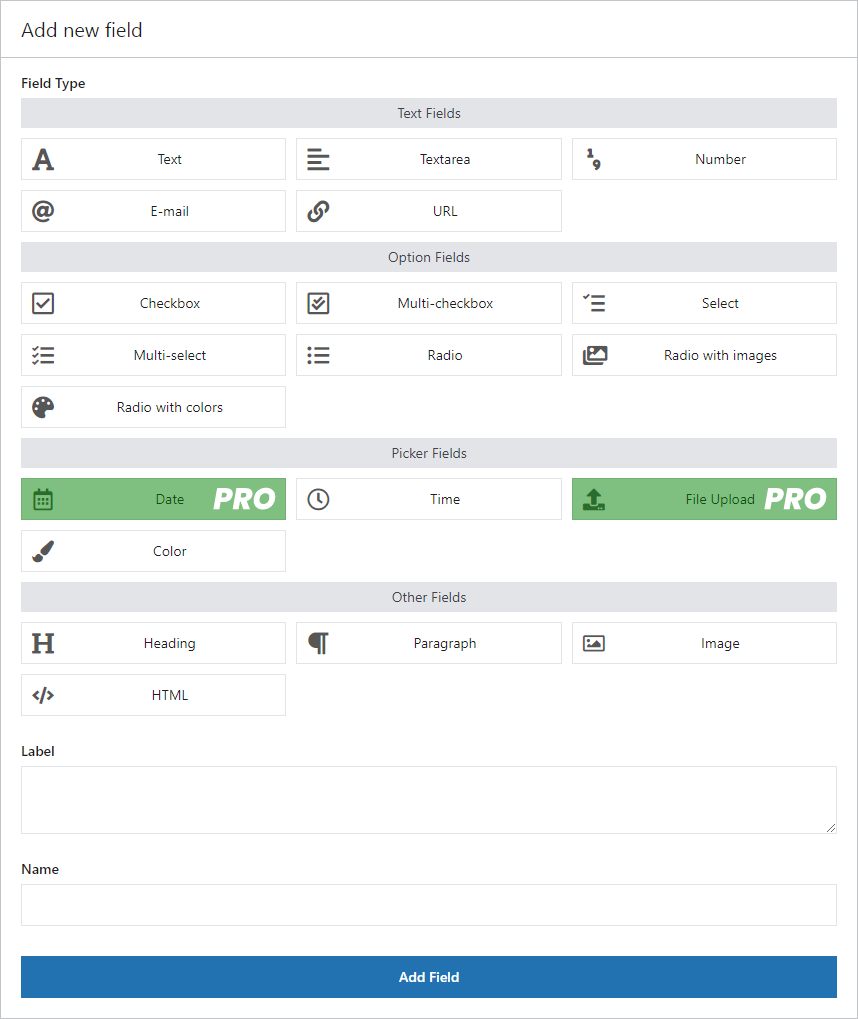
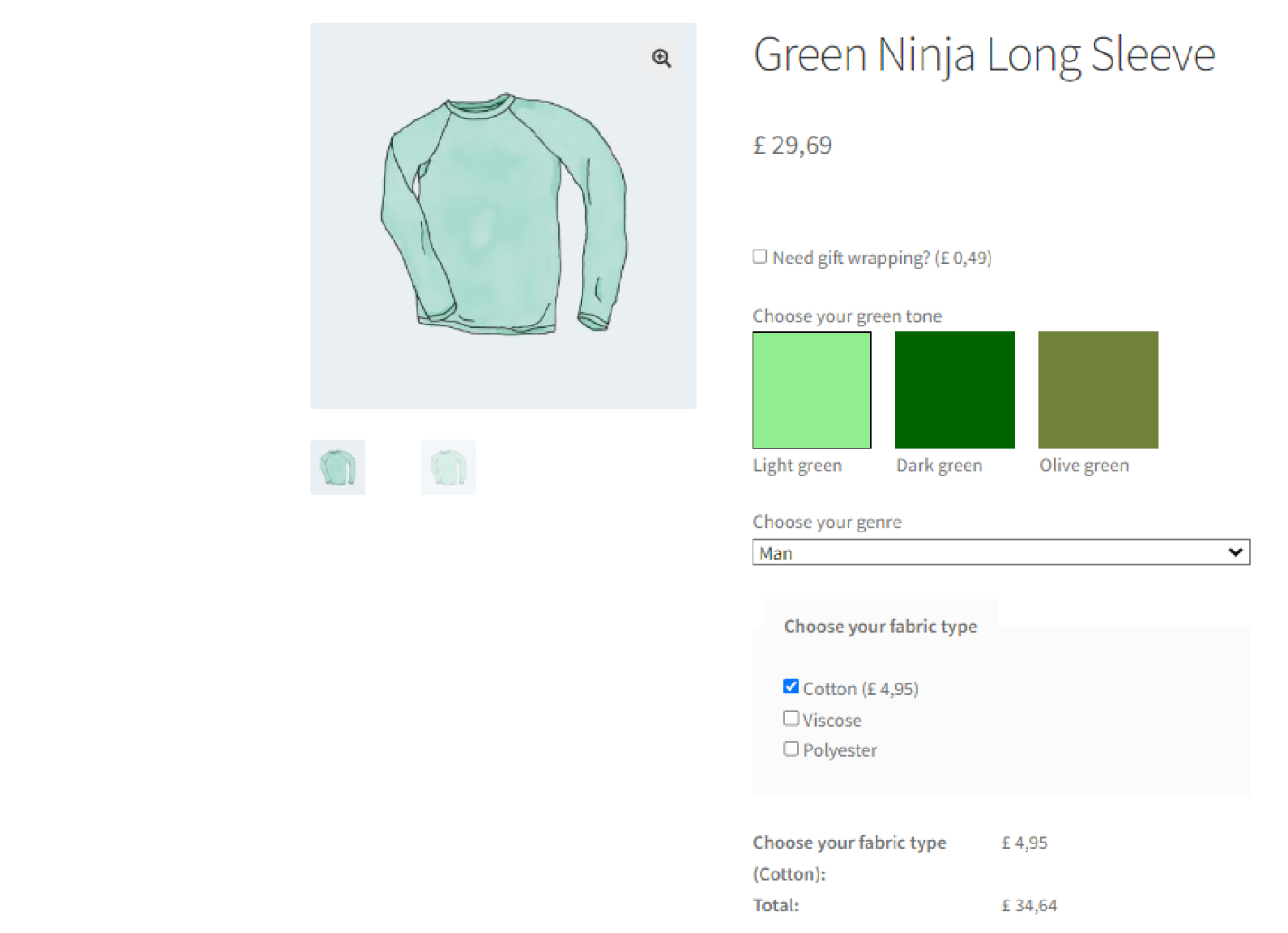
Ok, let's start by rechecking the standard WooCommerce product options (attributes and variations). Then, you will see the customization in the Flexible Product Fields plugin.
What are WooCommerce Extra Product Options?
Most of the e-commerce stores sell standard physical products. E-commerce platforms such as WooCommerce are well-made for them. However, sometimes stores need something more 😋.
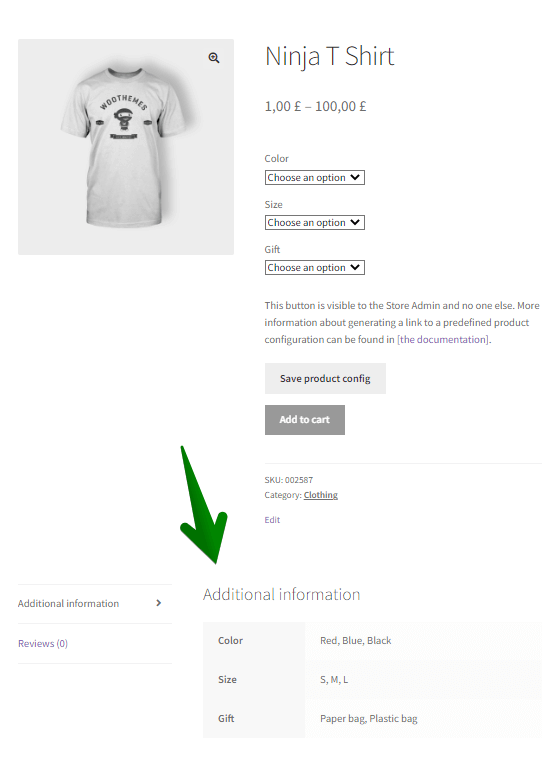
By default, WooCommerce lets you use product attributes:
You may also add WooCommerce variable products to give customers multiple product options:
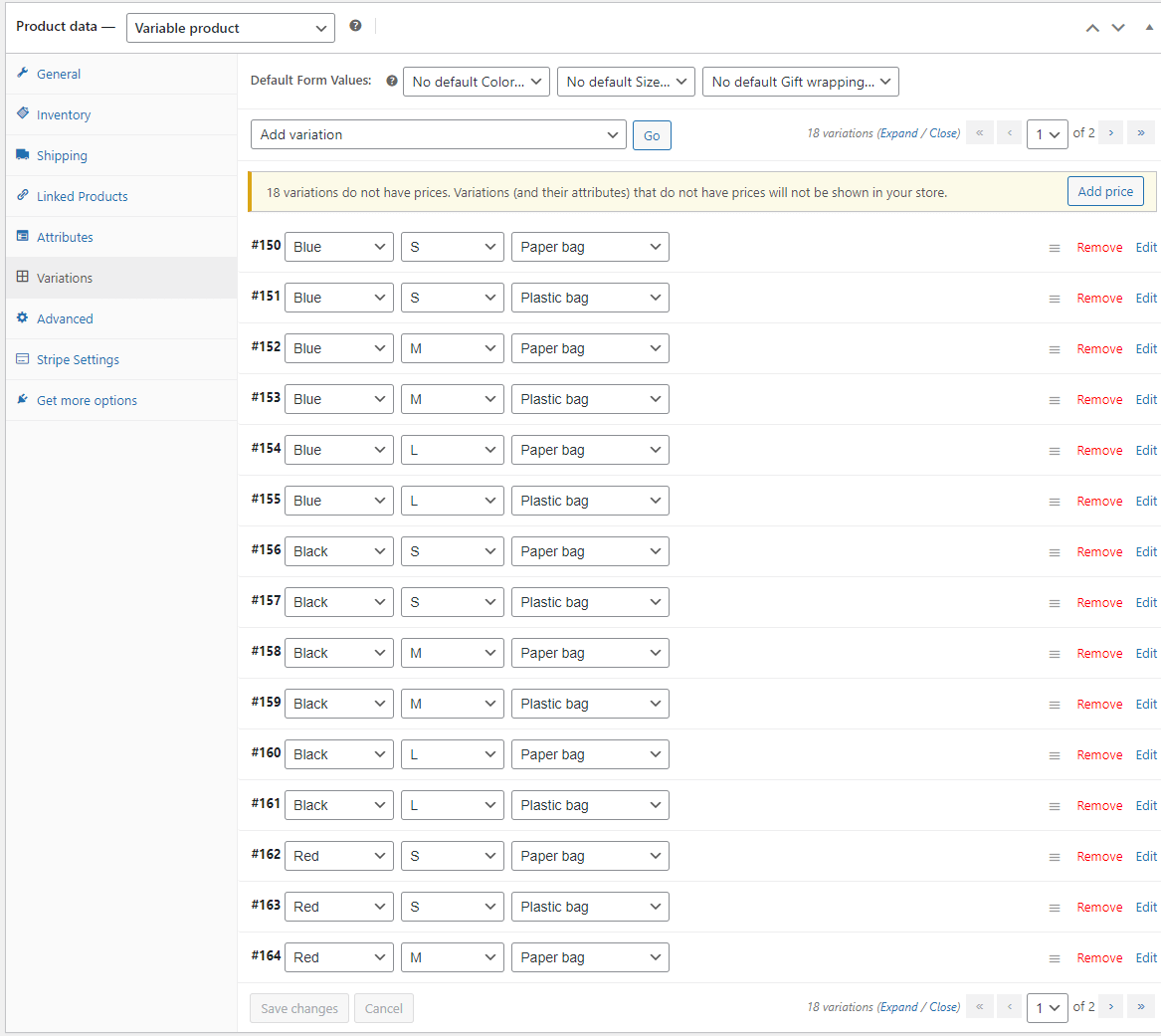
But these two solutions have their limitations!
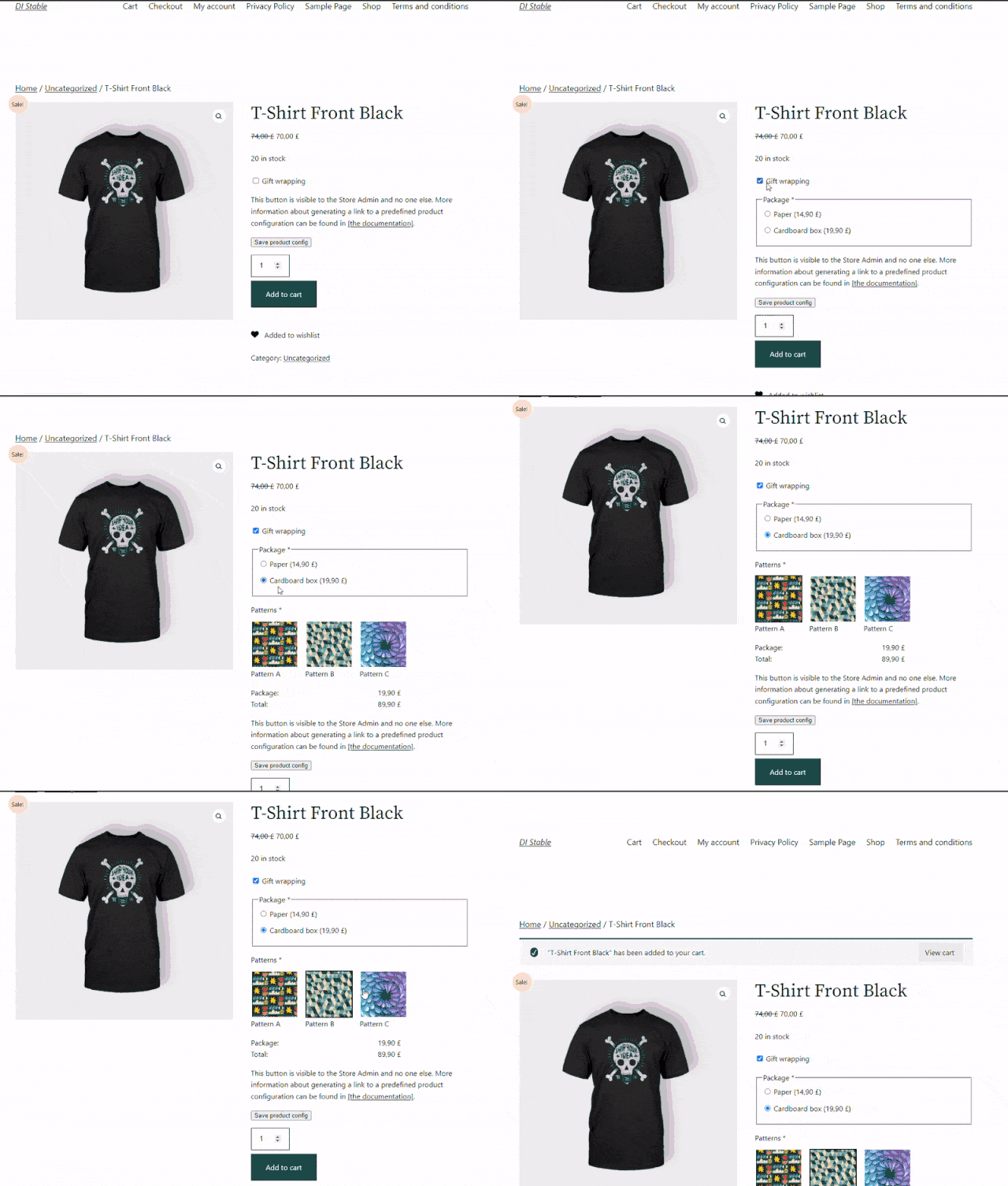
👉🏼 For example, you want your store to be more customer-friendly. You want to let a customer order a gift wrap. It's a very needed option for customers during holidays, Valentine's Day, and other events. The best solution would be to add a checkbox for such a feature. So, you can't use standard attributes or variable products here!
It is a product add-on as it is not built in WooCommerce itself.
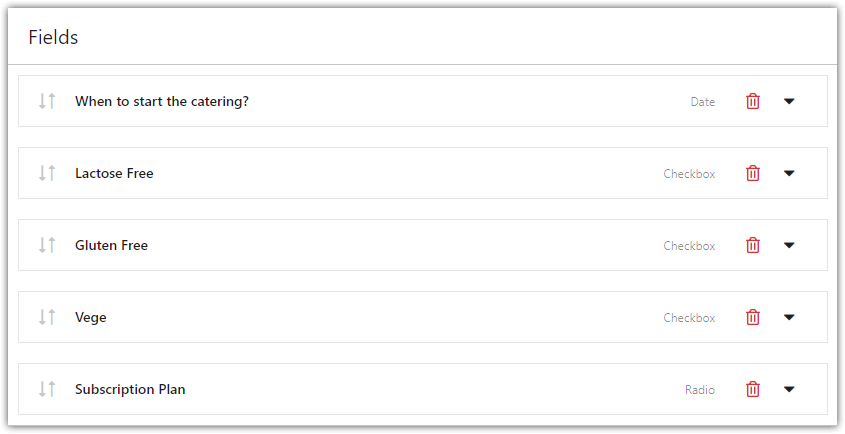
👉🏼 Another example would be a diet box store. You want to let customers choose a date to start a diet or what specific ingredients they would or wouldn't like to be included. To add such features you will need a WooCommerce plugin to add some extra (improved) product options.
Understanding the gap between WooCommerce attributes and true extra product options is the first step toward building a store that actually fits how you sell. Attributes and variations were designed to describe a product's inherent characteristics — the size it comes in, the color it's made of — not to capture a customer's individual request. The moment your business needs to collect information that varies from order to order rather than from product to product, you've outgrown what WooCommerce offers by default, and that's exactly the gap extra product options are built to fill.
How to add WooCommerce Extra Product Options?
There are plenty of plugins on the market. Based on our experience we've created our own! This is one of our free plugins used by thousands of WooCommerce stores worldwide.
That gives me the confidence to say that our plugin WooCommerce Product Add-Ons (Flexible Product Fields) is one of the best in its category.
Now, I am going to show you how to use it. All examples below use that plugin.
⏬ You can download the plugin for free at the link below: ⏬
All product fields explained
Extra options with WooCommerce Custom Product fields
WooCommerce Bookings made easy
You don't always need the overdeveloped WooCommerce bookings plugins. They are pricey because they have a lot of features. Not only are they expensive but also they consume a lot of your server power and time to configure. WooCommerce improved product options may be a cheaper and more lightweight option.
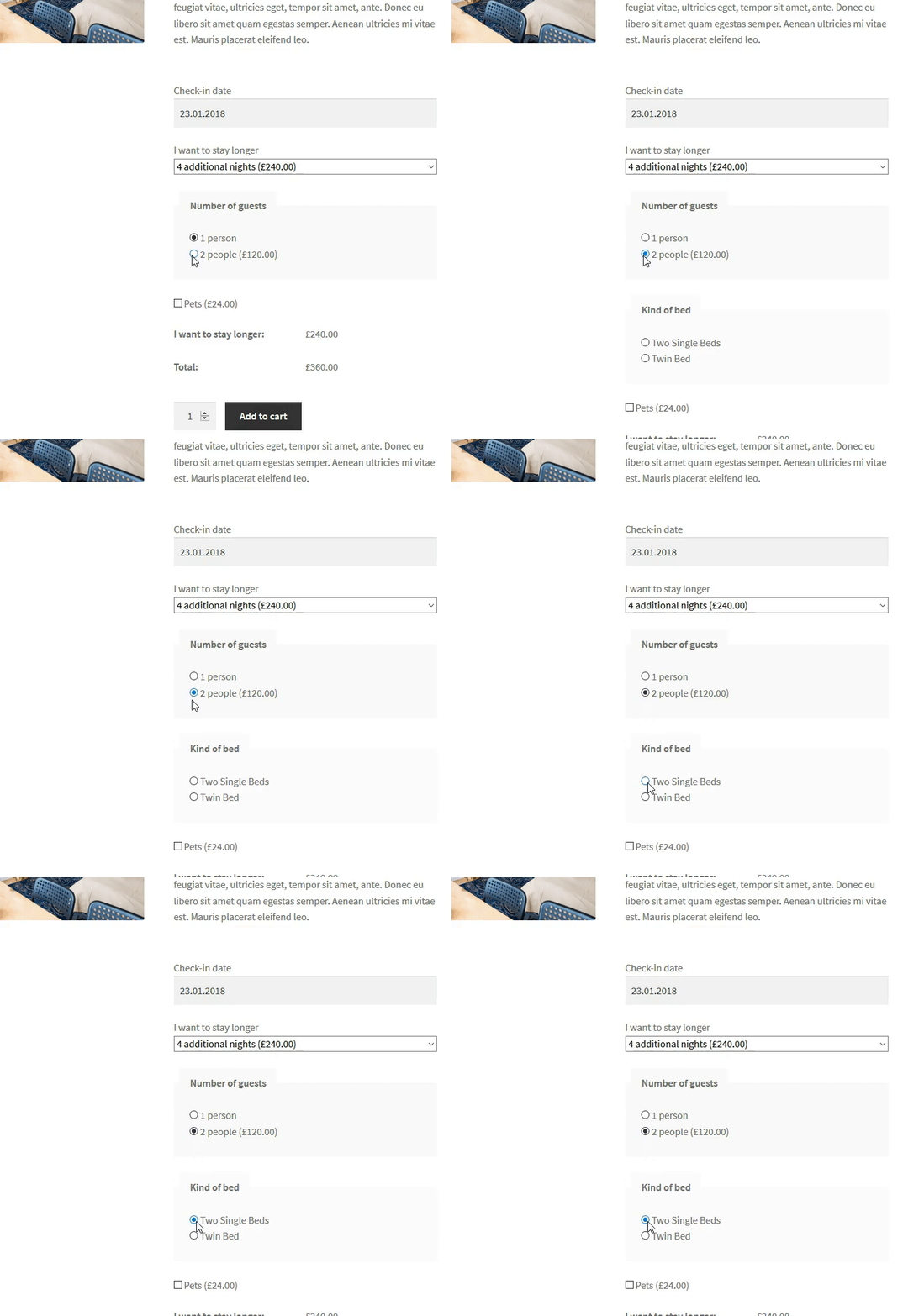
With PRO date fields, you can let the customer enter arrival and departure dates. These fields collect preferences; they do not by themselves manage availability or prevent overlapping bookings. They can specify the number of guests or choose the bed and breakfast option.
WooCommerce gift wrapping
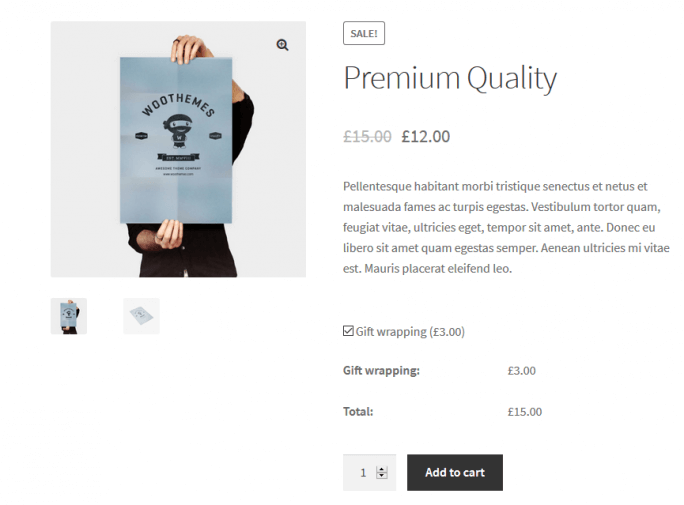
🎁 How about Christmas gift wrapping? It's a great idea for a last-minute present. There are a lot of special events during the year. Gift wrapping is a cool feature that could be attractive to your customers. Also, you could make more profit thanks to offering such a feature at an additional price.
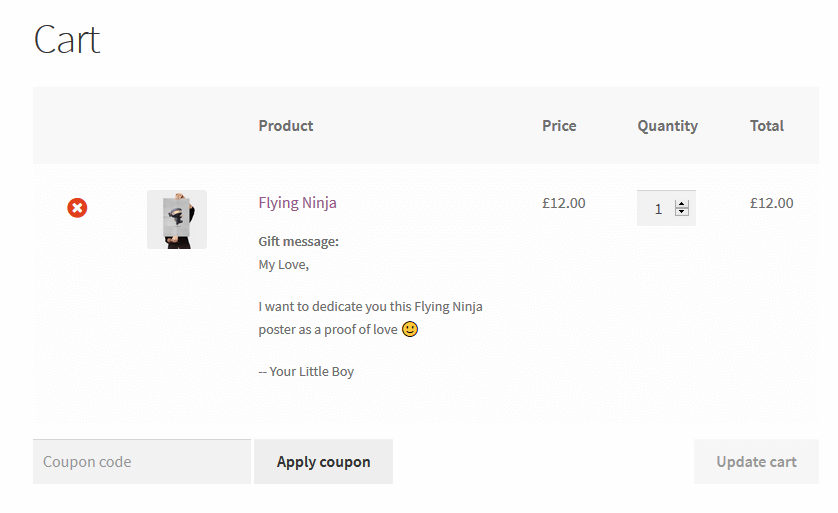
WooCommerce gift message
📨 It is another cool feature for your store. Gift wrapping is useful for a customer if they don't have time to do it themselves. A gift message is something different.
A customer can write a message in the form of a short letter that is added to a product by the store's staff before shipping. Such a gift could be then sent directly to the person your customer wants to give the present to.
WooCommerce catering ordering
People are more and more interested in healthy eating these days. Yet, keeping a diet all by yourself is a difficult day-to-day task. Counting calories, making lists of meals, shopping, and cooking. These people are in need! However, there is a simple solution: food boxes or personal catering.
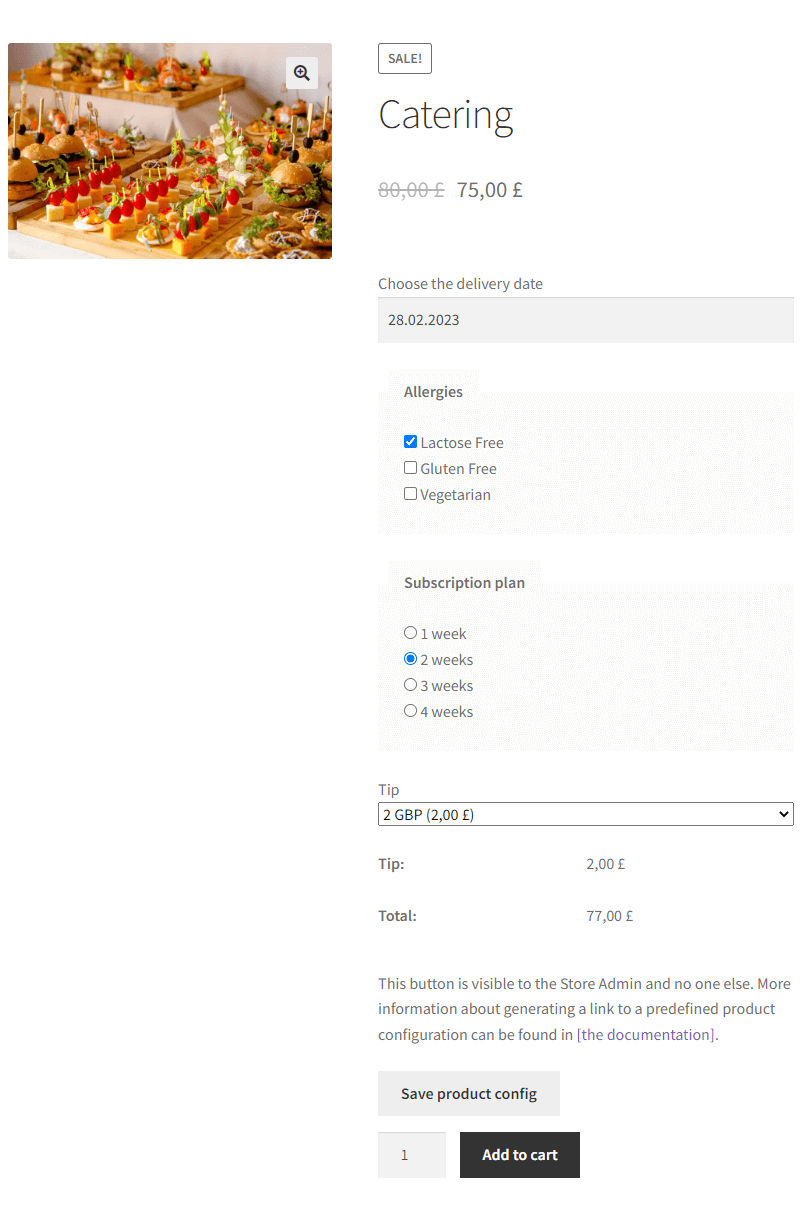
You don't need a dedicated plugin to add catering options to your WooCommerce site. All you need is WooCommerce extra product options that allow you to add such elements as a PRO date field (catering service start date), a select field, and a checkbox to include or exclude some ingredients from the diet. Charging extra for a selected option also requires PRO.
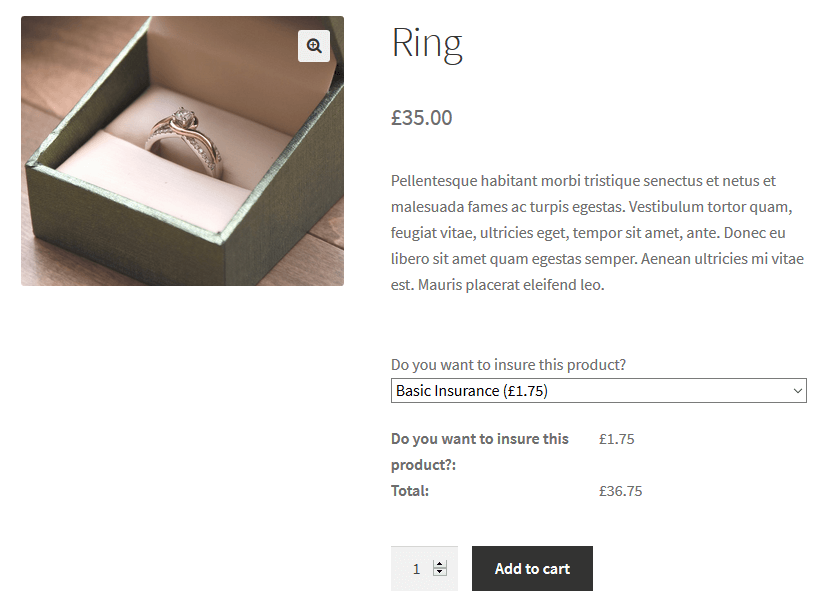
WooCommerce insurance for products
More and more stores cross-sell insurance for the products they offer. It is a very good idea as it can provide you with an additional profit. Insurance companies split profits with the middlemen, which in this case, are the stores.
WooCommerce product engraving
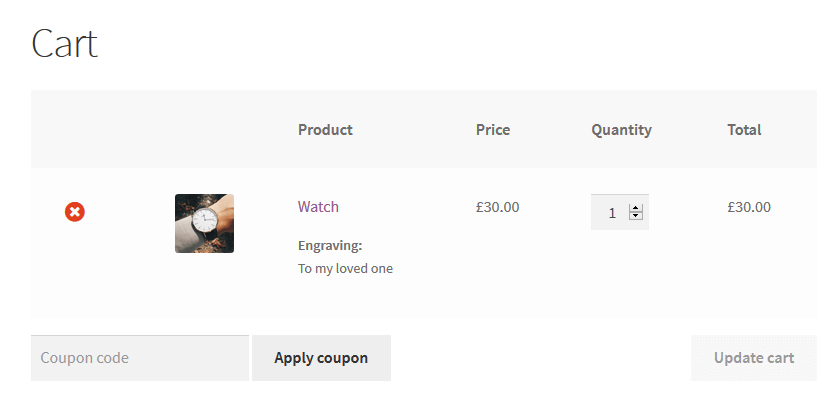
If you sell products that you can make engravings on, you have to add the WooCommerce product engraving feature to your store! We value unique things. That’s why we like to personalize things we own or the ones we give to others as gifts. Such a feature as engraving can provide a perfect personal touch.
WooCommerce Computer Builder
You can create a computer configuration wizard in your store, too!
Some customers need more RAM and a better GPU because they work on videos. Programmers prefer high-end CPUs. Different customers have different needs.
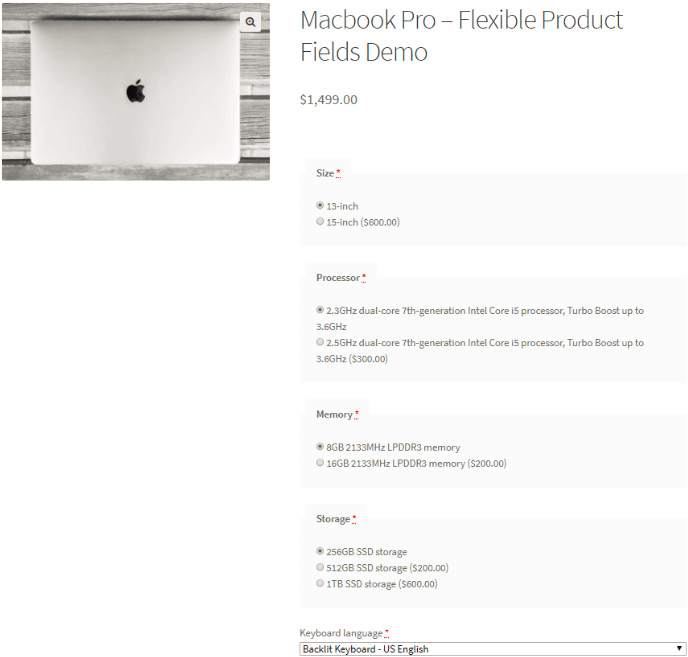
The examples above only scratch the surface of what's possible once you move past standard attributes. Pet stores can let customers specify their pet's name for a personalized collar, wedding shops can collect the date and names for custom invitations, and B2B suppliers can add a field for purchase order numbers or delivery instructions specific to each order. What ties all these scenarios together is the same underlying need: capturing order-specific information at the point of purchase, rather than relying on customers to email it separately or leave it in a generic order note that's easy to miss.
Why WooCommerce extra product options boost conversions
Adding extra product options to WooCommerce isn't just a nice-to-have feature — it directly affects your store's conversion rate and average order value. When customers can personalize a product before adding it to the cart, they feel more confident about their purchase, which reduces returns and cart abandonment. On top of that, optional add-ons such as gift wrapping, engraving, or extra ingredients give you an easy way to increase the order value without discounting anything. A well-configured set of WooCommerce custom product options can turn a simple physical product into a tailored experience, which is exactly what today's online shoppers expect from a modern e-commerce store.
More use cases for WooCommerce custom product options
Beyond the examples above, WooCommerce extra product options work well for stores selling furniture (letting customers pick fabric, color, or finish), event tickets (collecting attendee names or dietary requirements), and subscription boxes (choosing flavor or frequency preferences). Florists can use a PRO date field to collect a requested delivery date, while print-on-demand shops can collect text in the free version and files with PRO. The free plugin lists 18 field types; this is a count of available types, not a limit of 18 individual fields. PRO adds date and file upload fields, conditional logic and extra pricing.
When deciding which field types to use for your extra product options, it helps to match the field to how customers naturally think about their choice. A short, single answer like a name or size preference fits a text field; a yes/no decision like gift wrapping fits a checkbox; and a choice between several fixed options, like delivery time slots, fits a select or radio field. Choosing the right field type isn't just about functionality — it also keeps the product page intuitive, so customers spend less time figuring out how to answer and more time completing their purchase.
Is there a free plugin for WooCommerce extra product options?
Yes. Flexible Product Fields is free to install from WordPress.org and includes text fields, checkboxes and selects. Date pickers, file uploads, conditional logic and extra pricing require PRO.
Set limits before you publish: validation, required fields and file sizes
Extra product options collect what the customer types, so the limits you set help your team fulfil the order. Engraving is a clear example: a text field with no character limit can receive a sentence that does not fit on the item, leaving someone to contact the customer. Set the maximum length to what the product physically allows, and explain that limit in the field label so the customer sees it before typing.
Mark a field as required only when you cannot fulfil the order without its value. A catering start date may be essential, while a gift message can remain optional. When a field is needed only for a particular choice, use PRO conditional logic: show the engraving text field after the customer selects engraving. Test both the visible and hidden states before publishing.
File uploads require PRO. Before launch, set the allowed file types, number of files and maximum file size in the field settings, and check the upload limits imposed by your hosting environment. Test a realistic print-ready file rather than only a small sample. Also check where uploaded files are stored, who can access them and how your backup and order-retention processes handle them. Place a test order from the product page through checkout, then verify the field values and uploaded file access in the order screen.
Summary & more about the plugin
Are you ready to use WooCommerce Extra Product Options?
Perhaps WooCommerce extra product options seem like a set of some simple features, not improved ones. However, they are really powerful! You can use them either as additional features or as an alternative to other robust and often expensive plugins.
Check out the Free Flexible Product Fields plugin.
Flexible Product Fields WooCommerce
Add advanced product options and custom fields for WooCommerce products with one plugin!
Download for free or Go to WordPress.orgFinally, we'd be happy to get feedback from you! Please use the comment section below and let us know what you think.
FAQ
Can I add extra product options to variable WooCommerce products?
Yes. Flexible Product Fields can add options alongside WooCommerce variations. PRO lets you assign field groups to specific variations, so the fields shown can depend on the variation selected. Date pickers also require PRO.
Do WooCommerce extra product options slow down my store?
The impact depends on the number of fields, conditional rules, images and the rest of your store setup. Test the product page with your actual configuration on desktop and mobile, especially after adding larger field groups. A plugin's feature list alone cannot guarantee unchanged loading times.
Can customers be charged extra for selecting a product option?
Yes, with PRO. You can apply fixed or percentage-based charges to selected options. Conditional logic is also a PRO feature.
Is there a free plugin for WooCommerce extra product options?
Yes. Flexible Product Fields is free to install from WordPress.org and includes text fields, checkboxes and selects. Date pickers, file uploads, conditional logic and extra pricing require PRO.
Where do extra product options appear after the order is placed?
The selected options and their values appear with the product in the cart, checkout and WooCommerce admin order details. Check the order confirmation email during a test purchase too, especially if you use a custom email template, so the customer and fulfilment team receive the information they need.





I love how straight forward this plugin is. Will it work with grouped products? I set one up on my demo site and it asks the questions, but does not display answers in cart or checkout.
Ist it possible to create sub-conditions for products? Example: product A is a book. It cann be purchased as an ebook or a print version. The ebook version again is available in different file-formats. The print version is available as hard or soft cover.
Hi Hubert, yes, the plugin gives the option to add fields with conditional logic, which appears when the condition is met. Look at the screenshot with example of setting up the field: https://wpdesk.link/pr/2018-03-09_14.48.55.png Using the plugin you can create a tree of self-dependent fields with additional prices. cheers, Przemyslaw
really interested, i have a complex question about it. i’m selling virtual products (cooking courses). My client prefer receive it in his own emails and then give it away. Thus, are there possibilities to receive it as a card in the buyer email? May be generating a cupon code or something similar!
Hello Juanma! This looks like a really interesting strategy. You can use Downloadable Product feature that is built in the WooCommerce. Please check the official documentation for more info: https://docs.woocommerce.com/document/digital-downloadable-product-handling/
A client of mine runs a tour company. We have their tours all set up as products within WooCommerce which then link through to a 3rd party booking system. They’d now like to add the ability to purchase each tour as a Gift Voucher, would this be possible with your plugin?
Hi, we are developping a paint store that will sell different brands of paint and where each brand has its own palette of colors. Problem is that some brands have nearly 100 different colors available so we need to find an elegant way of showing the brands with colorselection BUT we also want to start from the color (in case you have no brand in mind) where you select your color and get a result of all brands with that color in the webshop. This competitor offers that solution in Magento 2 – we would like to start with WooCommerce. Any idea what add-on we would need / exists for this challenge? competitor link: https://www.darkwhite.be/jotun-demidekk-optimal-dekkende-beits.html thanks for any advice, Roeland
Hi, I’m selling a set of 2 t-shirts of the same design, with the option to choose same colors for both t-shirts or different color for each of the 2. Each design have 8 colors to choose from, and customers can buy 2 of the same color or 2 different colors. On the inventory side, will this plugin allow us to enable stock count on each color of the product, so the colors chosen be deducted accordingly? Hope to get an idea how this will work on the backend, thanks in advance!
Hi, There is a product on my website. There are price options I created with TM Product Options options. (Such as 100cm = $ 100, 200cm = $ 200, 300cm = $ 300). On the product listing pages, I want the price of that product to appear as $ 200 for 200cm. How can I do it?